
Grimoires Era Party Guide: Invites, Team Management and XP
Form a Party in Grimoires Era to play alongside friends, find each other on the map, and earn extra EXP while staying close.
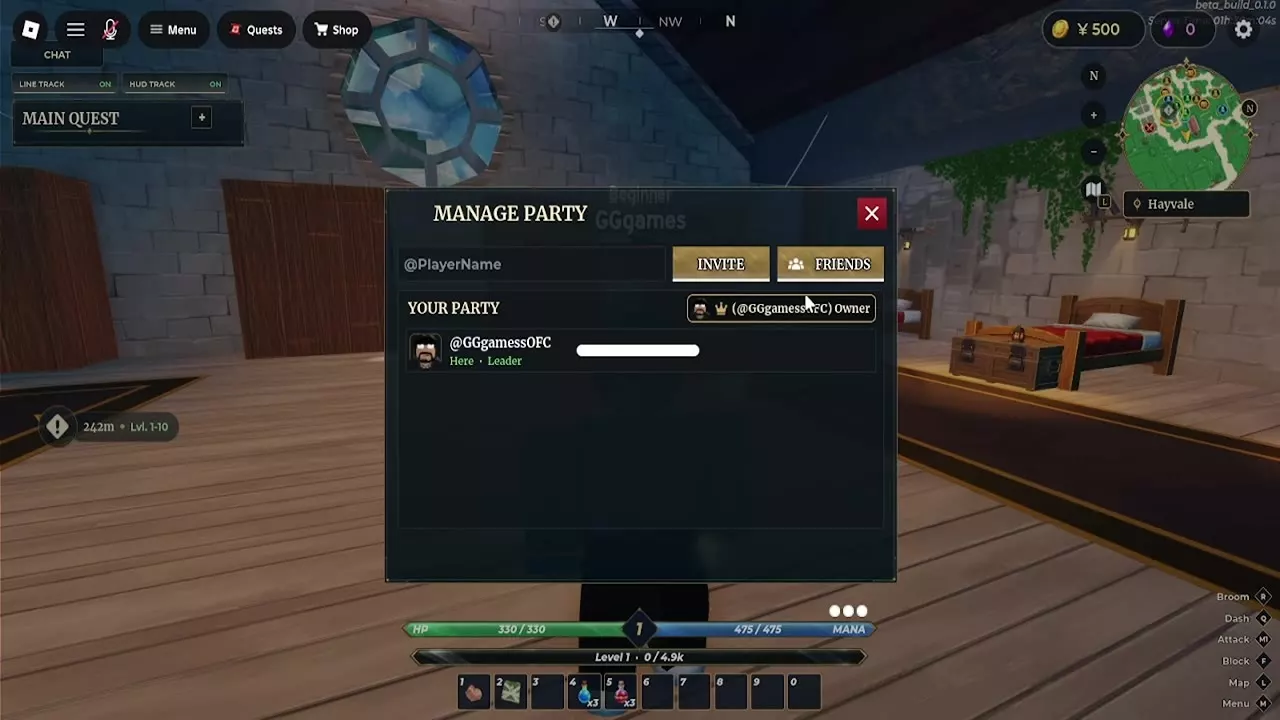
Open Party in the character menu and invite players by username or through Friends, or use Invite Party in the Players list. A Party holds up to four players. Accept an invitation before its countdown expires, then use the map’s Party layer to find teammates and stay close for extra EXP.
Four-Player Parties
A Party is a temporary group with room for four players, including you. Check Manage Party for the roster and occupied slots. If it shows 4/4, a slot must open before another player can join.
A Party is separate from a long-term Squad and from the Mana Dungeon’s ten-player capacity.
Find Teammates and Earn Nearby EXP
- Open the world map with L on keyboard or select the minimap.
- Turn on Party in the map legend. Its switch is separate from Other Players.
- Select a teammate’s marker to see their name and distance, then choose Set Route to use the marker as your destination.
Fight and earn EXP near your teammates to receive the proximity bonus. Manage Party displays the current roster and an EXP percentage beside the member count; for example, a three-player Party has displayed 3/4 and +20% EXP. If the group splits up, use the markers to regroup. The world map guide covers other locations and map markers.
Invite and Accept Players
- Open the character menu and select Party.
- In Manage Party, enter a username in @PlayerName and select Invite, or open Friends to invite a friend. You can also select Invite Party from the Players list.
- The recipient selects Accept before the invitation countdown expires, or Decline to refuse.
- Check the roster and member count to confirm who joined. The Players list reports when someone is already in your Party.
Manage Leadership and Leave
Open Manage Party to see the Owner, Leader, and member status labels. As leader, use the leadership control on a member’s row to hand over leadership, or select the red remove button to remove that member.
When a Party is full at 4/4, removing a member frees a slot and brings back the username field and Invite button. Select Leave at the bottom of Manage Party to exit your Party.
Squads and Dungeon Runs
- Use a Squad for a longer-term group with member roles and shared reputation.
- Plan a cooperative Mana Dungeon run around its entrance, rooms, and personal treasure chests.