Grimoires Era Server Guide: Public Servers and Private Codes
Choose a Grimoires Era server by region, player count, friend, or private server code.
Open Servers and use Public to search by region or map, or use Roblox’s Servers tab to sort by player count. To join a private server, enter the host’s fixed eight-digit code under Private. Hosting requires the 499 Robux VIP Server pass.
Public and Private Server Tabs
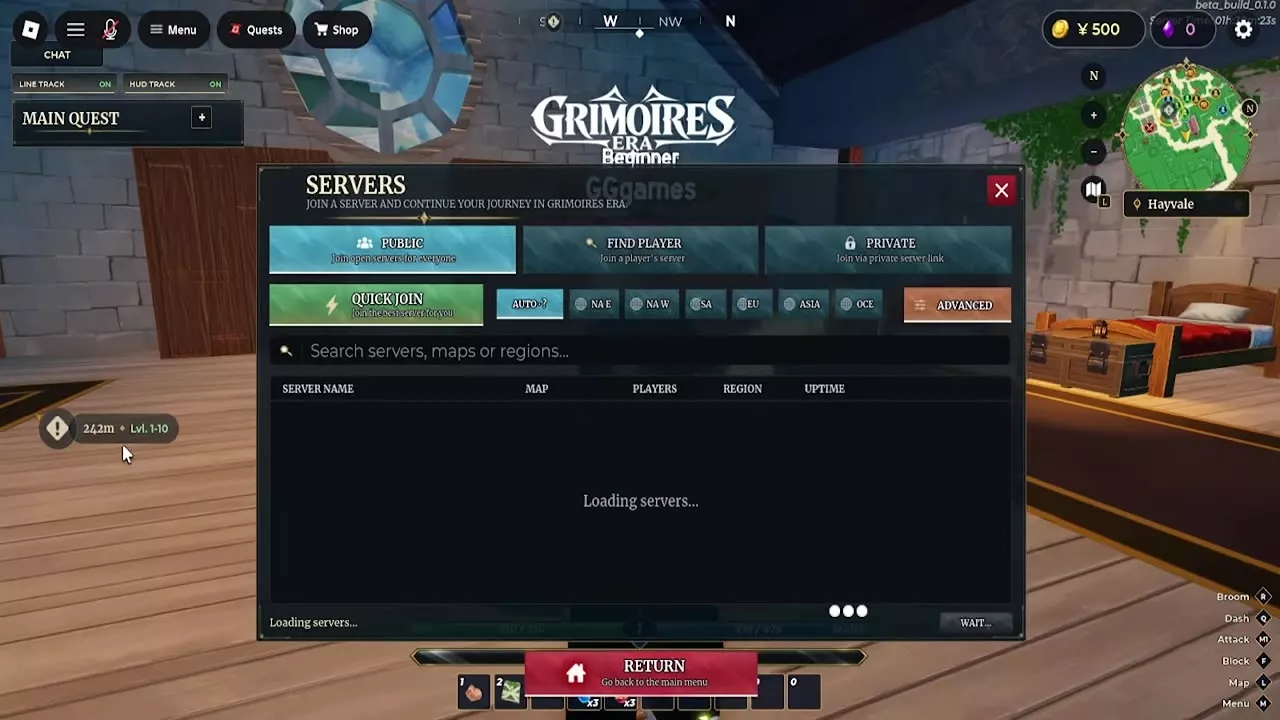
Open Servers from the main menu or the in-game player menu. Public lists open servers, while Private provides access to VIP servers and code entry. Public servers hold up to 30 players.
Find a Public Server or Friend
- Open Servers and select Public.
- Choose Auto, NA E, NA W, SA, EU, ASIA, or OCE. You can also search by server name, map, or region.
- Check the server name, map, player count, region, and uptime, then use the join control on the row you want. Select Quick Join to let the game choose a server.
To look for a particular player’s server, open Find Player. You can also open the Roblox game page’s Servers tab and check the section showing servers your friends are in.
Join a Low-Population Server
- Open the Grimoires Era page on Roblox and select Servers.
- Under Other Servers, sort by Fewest Players and turn on Exclude Full Servers.
- Compare the player counts, use Load More for additional listings, and select Join on a server card.
Switching servers can also help you look for an existing boss spawn. In Update 1, Elf Leader spawns on a 20-minute interval in each server; check the arena after joining another server.
Join or Host a Private Server
To join with a code, get the host’s fixed eight-digit code, open Servers → Private, enter it in Join Code, and select Join. The Private tab also lists your own VIP server and friends’ servers, with World 1, World 2, and World 3 options.
To host, open the VIP Server purchase prompt from Private. The VIP Server pass costs 499 Robux and provides a private server with a fixed code you can share with friends.
Party Invitations and Game Passes
After joining the same server, use a party invitation to group up. For the VIP Server pass and other purchases, see game passes and shop options.